A predicted delay needs more than distance
For a late-arrival warning to mean anything, the load needs an appointment to compare against and a useful estimate of when the truck can reach it. A straight line from the last dot to the delivery address leaves out the road route, the age of that dot, and driving constraints.
LoadSignal stores a system ETA for the next stop and compares it with the appointment window. The warning includes the estimated arrival, the appointment, and the predicted number of minutes late. ETAs are planning estimates, not guarantees.
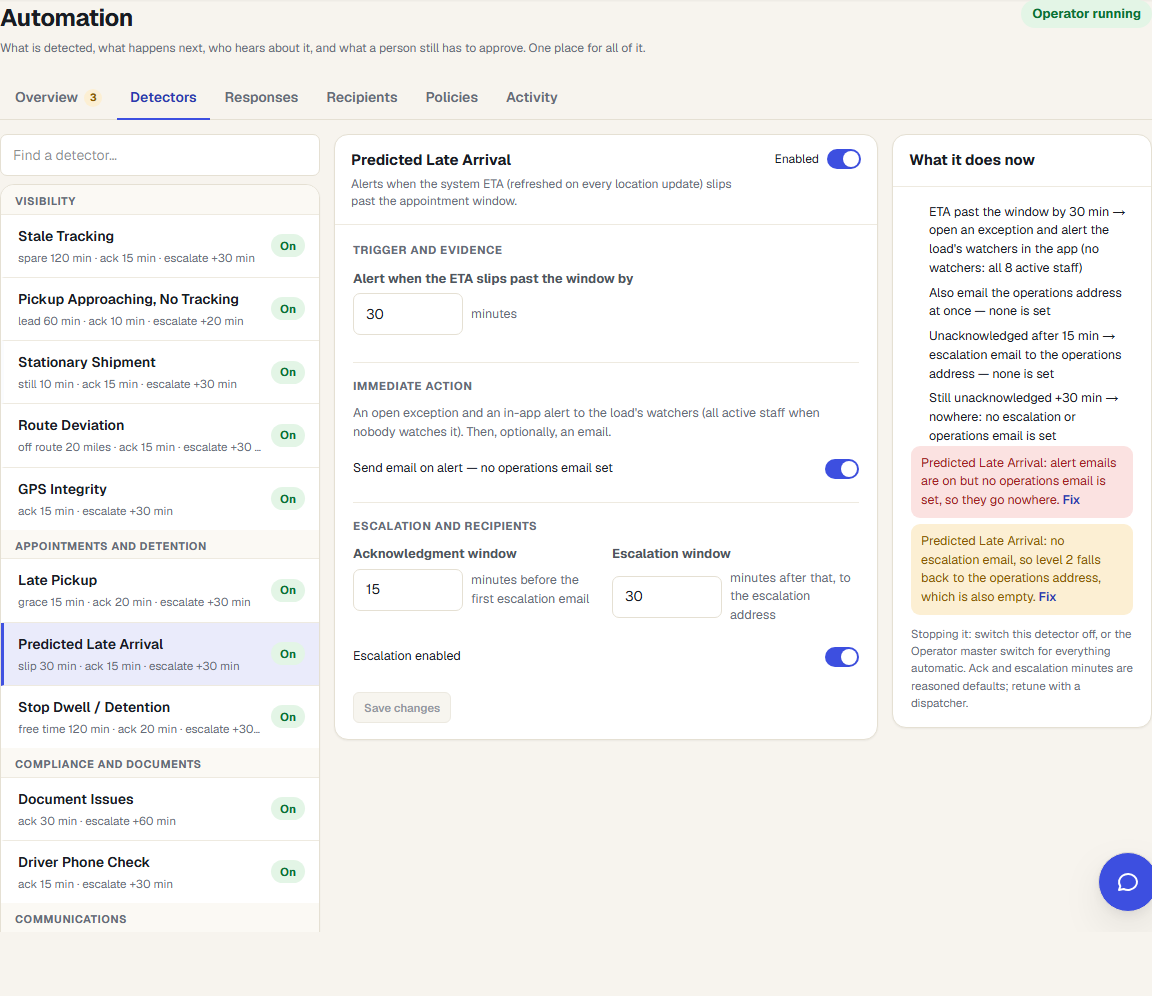
The threshold controls when a warning opens
The predicted-late check has an enabled setting and a configurable slip threshold. Once the estimate crosses that threshold, only a medium- or high-confidence ETA can open a predicted pickup or delivery delay. A low-confidence estimate does not qualify to open that warning.
This is different from an overdue pickup check, which examines a pickup that has already missed its expected timing. Before the appointment, a predicted warning gives dispatch time to confirm the situation. After it, an overdue condition describes what has already happened.
What if the position is too old?
A missing or weak estimate should prompt a check of the source. LoadSignal exposes tracking freshness and ETA confidence so the dispatcher can judge what the time is based on. No warning is not proof that the load will arrive on time.
Hours-of-service data can inform planning when an authorized ELD connection supplies it. Without that data, do not assume the product knows how much driving time this driver has left. Confirm the driver's available hours when the delivery commitment depends on them.
Follow up on the load that needs a decision
The delay condition can feed a supported Track & Trace Operator rule when that feature is enabled. Its mode and action settings control what happens next. An AI-drafted customer delay message stays pending until a person approves it.
Dispatch still decides whether to ask for a revised appointment, contact the shipper, or agree on a new ETA. Software can surface the variance and prepare the follow-up; it cannot make a receiving facility accept a late truck.
Evaluate it on your actual appointment rules
During setup, check stop time zones, appointment start and end times, and the threshold that makes a warning useful to your team. Test a load with an appointment window, one with only a single appointment time, and one with no recent tracking. Those cases reveal more than a demo where every source is healthy.
Read what an honest truck ETA needs for the planning inputs, or customer updates for how to communicate a change.