What counts as a freight exception?
A freight exception is a condition that needs attention during a shipment: an overdue pickup, a truck that has stopped reporting, or delivery paperwork that has not arrived. Managing it means noticing the condition, deciding who should handle it, and following it through until it clears.
A position on a map answers where a truck was. An exception tells your dispatcher why this load needs a look now. LoadSignal brings those conditions into the load record, alongside its stops, messages, and tracking history.
Start with the evidence behind the alert
LoadSignal checks active loads on a five-minute schedule and reacts to relevant load events. Detection uses rules and thresholds. An AI model does not decide whether a load has stopped reporting or missed an appointment.
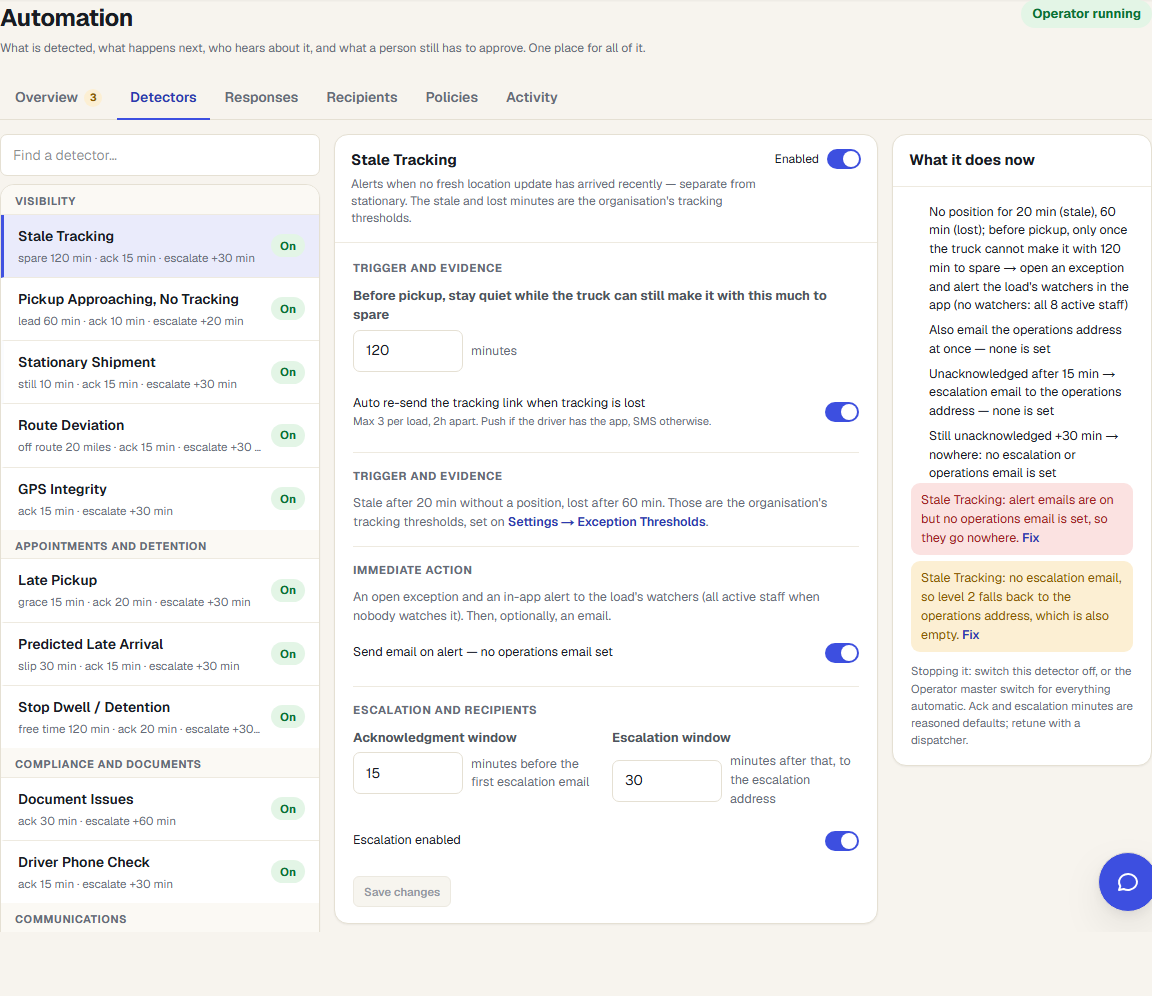
- Tracking freshness: a position has gone stale or tracking has been lost.
- Movement: a truck is stationary during transit or outside the planned route corridor.
- Appointments: pickup is approaching without tracking, a pickup is late, or an eligible ETA predicts a late arrival.
- Follow-through: a driver has not accepted dispatch, a carrier has not responded, a stop is running long, or paperwork is missing.
The load's phase matters. A truck waiting for a future pickup should not be treated like a truck that disappears halfway through transit. Thresholds and enabled checks should match how your brokerage runs its lanes.
Escalation needs an owner and a clock
You can configure acknowledgment and escalation windows for supported checks. Those windows give an alert somewhere to go when nobody picks it up. Configure the recipients during onboarding and test who receives each step before relying on it after hours.
The Track & Trace Operator adds actions for unaccepted dispatches, stale or lost tracking, and predicted late arrivals. It starts disabled. Driver-facing actions depend on the automation mode; customer-facing Operator messages queue for approval. Other detected conditions can still need manual follow-up.
Choose what automation may do
Detection, internal escalation, and sending a message are separate decisions. Enabling a check does not grant unrestricted permission to contact drivers or customers. Your team chooses the settings and reviews the resulting activity on the load.
Scheduled customer status emails are a separate, opt-in feature. An AI-written delay explanation still waits for a person to review and send it. See how customer updates work.
Check the workflow before you adopt it
Use a demo load to test a tracking gap, an acknowledgment, and an escalation. Confirm that the correct person gets the alert, that the evidence is understandable, and that recovery closes the condition you expect. This is a more useful evaluation than counting the dots on a map.
For a practical response sequence, read what to do when a carrier stops tracking. For appointment risk, see late-load detection.